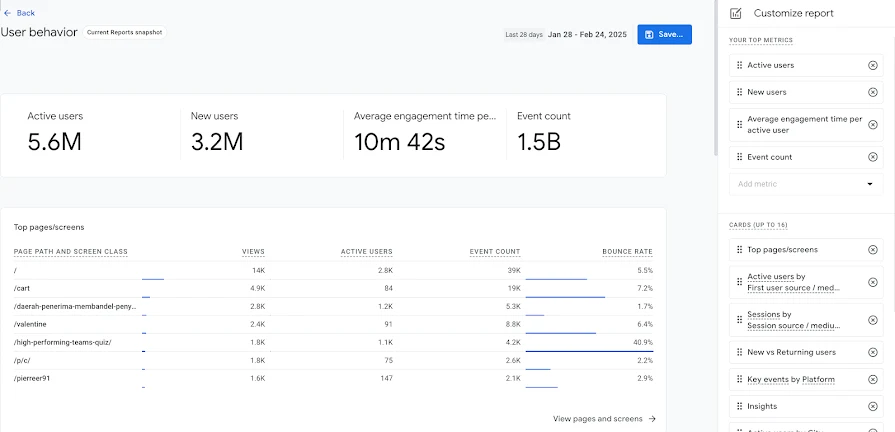
Google Analytics measures activity across websites and apps using events, reports and explorations. Teams can analyze acquisition, engagement, funnels and revenue, build audiences and connect measurement with Google advertising tools.
Google Analytics is a sensible measurement foundation for a business already using Google Ads or needing a free view of acquisition and conversion.
Free standard analytics
Web and app measurement
Event design and validation take work
Quotas and sampling affect some analyses
Best for:
Solo usersSmall teamsGrowing businesses
Best use case: Understanding which acquisition channels lead to product engagement and completed purchases.
Site owners and analytics teams can use event reporting; accurate setup and interpretation are required.
Read the full assessment
Google Analytics is a sensible measurement foundation for a business already using Google Ads or needing a free view of acquisition and conversion. The important work is defining events consistently and validating purchases, refunds and consent behavior. Standard can cover many teams; 360 needs a clear quota, governance or support requirement. Treat attribution as a model with assumptions, and reconcile revenue reporting with the source commerce system.
Strengths
Free standard analytics
Web and app measurement
Google Ads and BigQuery connections
Flexible funnel and exploration reports
Tradeoffs
Event design and validation take work
Quotas and sampling affect some analyses
Reporting has a learning curve
Cloud analysis can add separate costs
Who it suits
Teams measuring website and app performance
Businesses using Google advertising
Analysts needing exportable event data
About Google Analytics
Google Analytics measures activity across websites and apps using events, reports and explorations. Teams can analyze acquisition, engagement, funnels and revenue, build audiences and connect measurement with Google advertising tools. BigQuery export supports analysis outside the reporting interface.
Standard Google Analytics is free. Analytics 360 adds higher quotas, enterprise support and governance capabilities such as subproperties and roll-up reporting. A useful implementation starts with the questions a business needs answered, then defines and checks the events and conversions required to answer them.
Pricing & Plans
Prices use the currency shown. Tax, usage limits and billing terms vary by provider.
Annual billing
Recommended
Standard Google Analytics
$0/mo
Standard Google Analytics service.
Free of charge
Site/app measurement
Reporting
Attribution
Full plan details & limits
Standard Google Analytics service.
Free
Analysis
GA4 collection, reporting and retention quotas apply
Google Analytics 360
Contact sales
Enterprise tier for Google Analytics with higher quotas, more governance controls, and enterprise support.
Higher limits for collection, reporting, retention, and BigQuery export
Custom access controls
Sub-properties
Roll-up properties
Full plan details & limits
Enterprise tier for Google Analytics with higher quotas, more governance controls, and enterprise support.
Enter your complete quote
Automatic custom tables
Continuous intraday data within about an hour
Unsampled results
Public price not published on the official pages reviewed
Higher quotas than standard Google Analytics
Examples in the report include higher quotas for event parameters, user properties, custom dimensions and metrics, audiences, saved comparisons, data import storage, and event-level queries
Customer ratings from the linked platforms, separate from our recommendations. Scores and counts can change; each platform uses its own review process.
Integrations & connectionsHow Google Analytics fits into your workflow
Google Ads, Search Ads 360, Display & Video 360, Google Cloud / BigQuery export, Google Search Console, Google Ad Manager, AdMob, Google Play, Salesforce Marketing Cloud, Google Tag Manager, Tag Manager 360, Admin API
Platforms & availabilityWebsites · Mobile apps · Third-party systems via Measurement Protocol
Google
Free plan: Available. Free trial: Not verified.
Cost considerationsBilling, usage limits and additional fees
Standard GA4 has no subscription charge. Analytics 360 requires a sales quote; no fixed public price was verified. BigQuery storage or querying, paid connectors and implementation services can create separate costs. GA4 quotas vary by feature. Legacy Universal Analytics hit limits are excluded because they do not describe the current product.