OpusClip

Turn long recordings into shorter, captioned social videos.

Video Editing

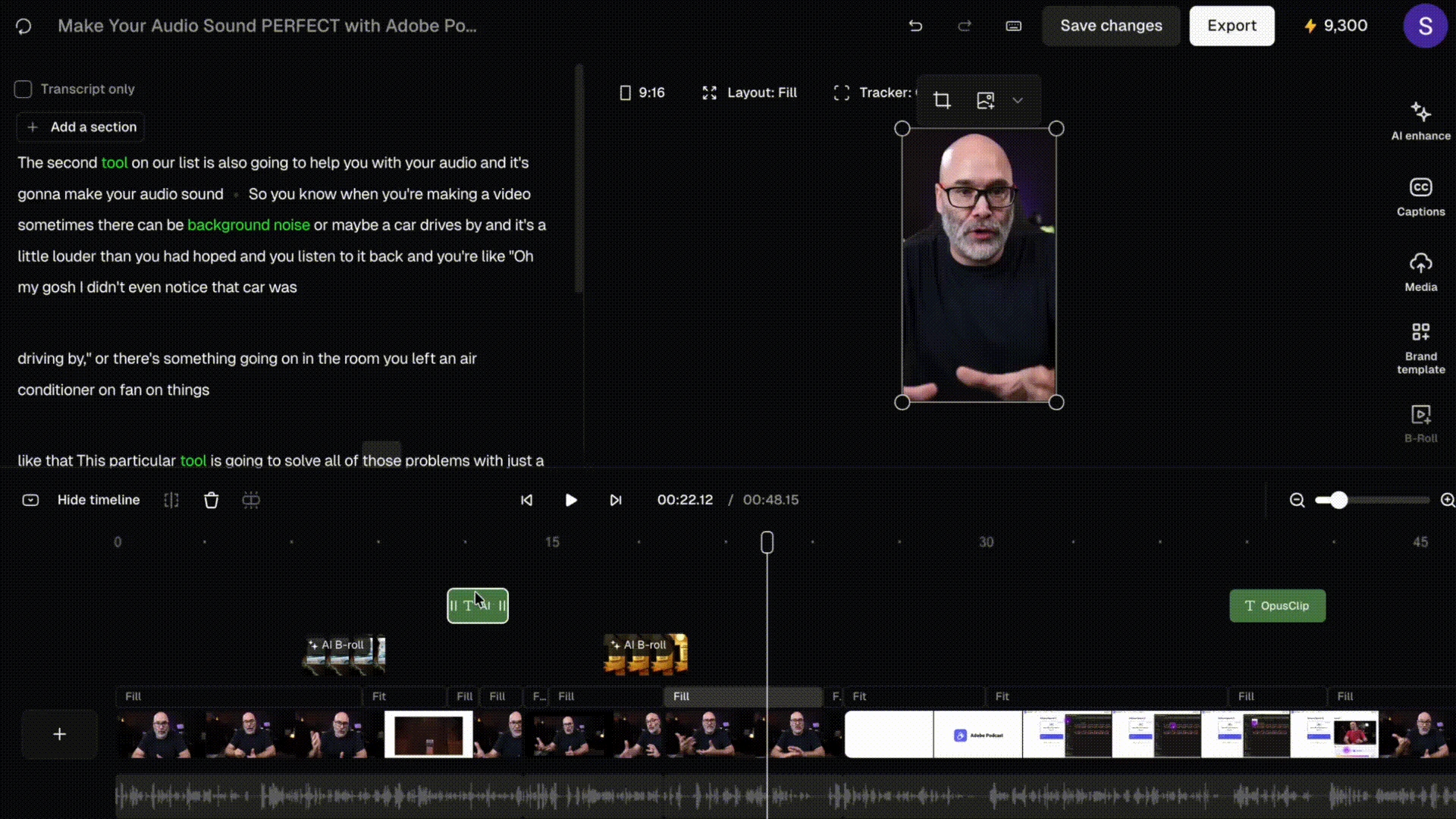
OpusClip turns longer videos into shorter clips by finding candidate moments, reframing the picture, and adding captions. A creator can start with an interview, tutorial, or webinar and prepare several vertical videos for social channels.

Public rating not verifiedFree clips have watermark and export restrictions.
Visit Website

Last checked: September 15, 2026

OpusClip transcript-based editor with video preview, captions, B-roll, and multitrack timeline.

Our Take

OpusClip can speed up repurposing when you already have useful long-form footage.

Best for:
Solo usersSmall teams
Best use case: Repurpose a webinar into short educational clips.

Repurpose a webinar into short educational clips. Extract product tips from a tutorial. Prepare captioned vertical excerpts from interviews.

Read the full assessment

OpusClip can speed up repurposing when you already have useful long-form footage. Treat its selections as candidates, then check the hook, context, captions, and ending. It cannot turn every recording into a compelling short. Pro is more relevant when multiple social destinations and an editing handoff are part of the workflow.

Strengths

  • Reduces the first pass of finding short clips
  • Reframing and captions support vertical content
  • Paid brand templates improve consistency
  • Pro adds publishing and editing handoff options

Tradeoffs

  • Selected moments still need editorial review
  • Processing credits limit source-video volume
  • Free exports carry restrictions and branding

Who it suits

  • Repurpose a webinar into short educational clips.
  • Extract product tips from a tutorial.
  • Prepare captioned vertical excerpts from interviews.

About OpusClip

OpusClip turns longer videos into shorter clips by finding candidate moments, reframing the picture, and adding captions. A creator can start with an interview, tutorial, or webinar and prepare several vertical videos for social channels. The editor lets the team review and adjust the selected clips. Plans differ in processing credits, branding, export access, and team publishing features. Free is useful for trying the selection process but has watermark and export-window restrictions. A source video with a clear speaker and useful standalone moments is easier to repurpose than an unstructured recording.

Pricing & Plans

Prices use the currency shown. Tax, usage limits and billing terms vary by provider.

Save up to 50% with annual billing

Free

$0/mo

For trying the clipping workflow.

  • 60 credits per month
  • Watermarked clips
  • 1080p output
  • 3-day export availability
Full plan details & limits

For trying the clipping workflow.

For trying the clipping workflow. Monthly billing.

    Starter

    $15/mo

    For occasional content repurposing.

    • 150 credits per month
    • Watermark-free clips
    • 1 brand template
    • Caption and filler-word tools
    Full plan details & limits

    For occasional content repurposing.

    For occasional content repurposing. Monthly billing.

      Pro

      $29/mo

      For a regular social production workflow.

      • 300 credits monthly or 3,600 upfront annually
      • 2 seats and 2 brand templates
      • 6 social account connections and scheduling
      • AI B-roll and editing-software exports
      Full plan details & limits

      For a regular social production workflow.

      For a regular social production workflow. Monthly billing.

        Business

        Contact sales

        For a larger content operation.

        • Custom production needs
        • Team and integration requirements
        • Commercial agreement
        Full plan details & limits

        For a larger content operation.

        For a larger content operation.

          View full pricing details

          Everything you need to know

          Explore more details about OpusClip.

          FeaturesAI-assisted long-video clipping · Automatic reframing for social formats · Caption generation and styling
          • AI-assisted long-video clipping
          • Automatic reframing for social formats
          • Caption generation and styling
          • Clip review and editing
          • Brand templates on paid plans
          • Scheduling and editor exports on Pro
          RatingsAn independent customer rating has not been verified for this listing.

          We could not verify a public customer rating for this specific product.

          Integrations & connectionsHow OpusClip fits into your workflow

          Pro supports social scheduling and exports for workflows such as Adobe Premiere Pro and DaVinci Resolve. Confirm connected-channel limits and export requirements before building a publishing routine.

          Platforms & availabilityWeb App

          Free plan: Available. Free trial: Not verified.

          Cost considerationsBilling, usage limits and additional fees

          Free includes 60 monthly credits with watermark and a limited export window. Starter is $15/month; Pro is $29/month or $174/year. Pro annual includes 3,600 credits issued upfront; monthly Pro includes 300 monthly credits. Credits are not a guarantee of a particular number of finished clips.

          Not sure OpusClip is right for you?

          Here are a few other great tools to consider.

          View All Alternatives

          Sources & Verification

          Checked September 15, 2026 · 2 sources · View sources

          Provider facts and pricing are separate from our editorial assessments.