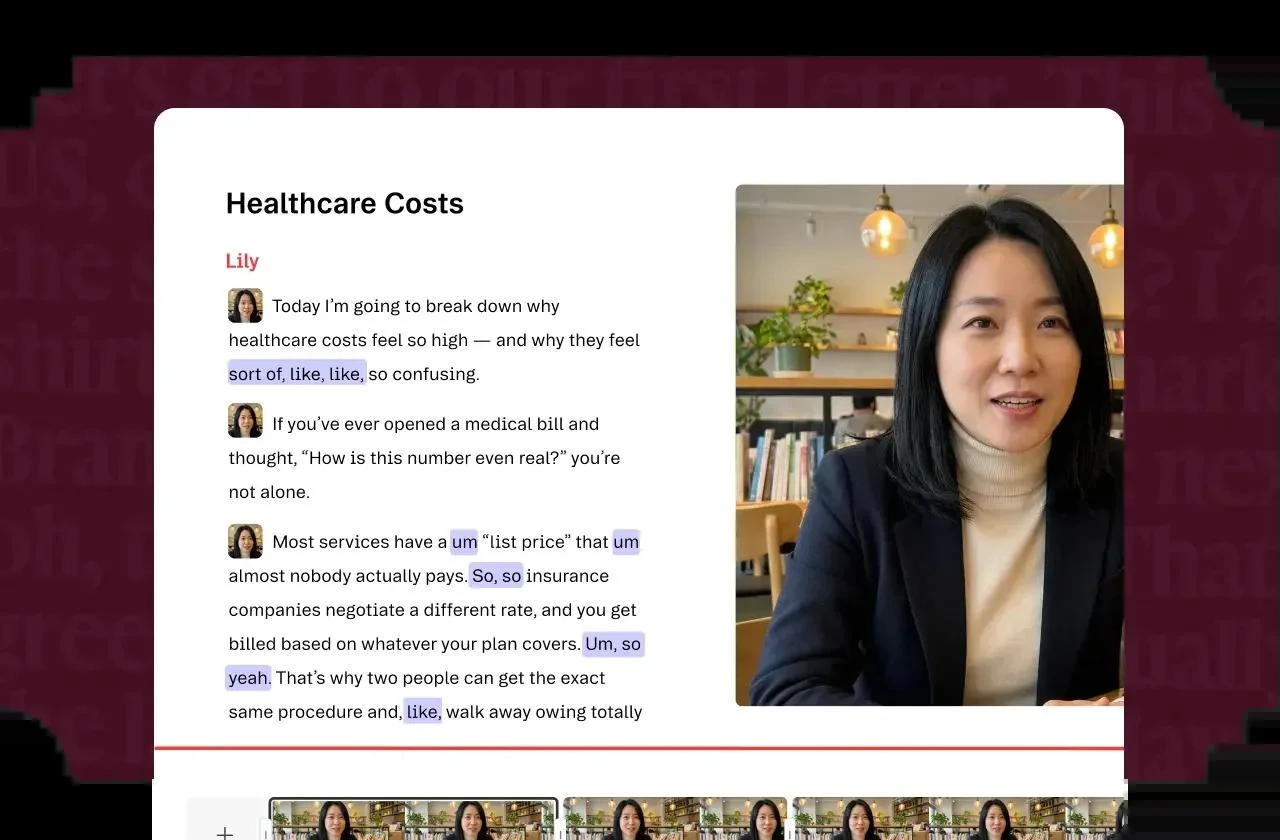
Descript combines recording, transcription and audio-video editing in a text-first workspace. Cutting or rearranging transcript passages changes the associated media; waveform and scene tools provide additional control.
Descript is particularly useful for interviews, podcasts, tutorials and other projects organized around speech.
Transcript and media editing stay connected
Recording, captions and cleanup in one workspace
Transcription and automatic cuts need review
Media hours and AI credits have separate limits
Best for:
Solo usersSmall teams
Best use case: Editing a recorded interview and producing captioned highlights from the same project.
Useful for independent podcasters and small teams editing spoken-word content.
Read the full assessment
Descript is particularly useful for interviews, podcasts, tutorials and other projects organized around speech. Working from a transcript makes it easier to find passages and create a rough cut, with sound cleanup and captions close at hand. Hobbyist suits regular individual editing; Creator is worth comparing for longer recordings, 4K output and top-ups. Review the transcript and listen to every cut, since a clean sentence on screen does not guarantee a natural-sounding edit.
Strengths
Transcript and media editing stay connected
Recording, captions and cleanup in one workspace
Tools for repurposing longer recordings
Export paths to other production applications
Tradeoffs
Transcription and automatic cuts need review
Media hours and AI credits have separate limits
Complex visual editing may need another application
Additional editors and top-ups increase cost
Who it suits
Podcasters and interview editors
Tutorial creators
Teams repurposing webinars
About Descript
Descript combines recording, transcription and audio-video editing in a text-first workspace. Cutting or rearranging transcript passages changes the associated media; waveform and scene tools provide additional control. Captions, sound cleanup, filler-word removal and clip creation support turning a longer recording into publishable material.
Rooms supports remote recording, while shared projects and Brand Studio help teams collaborate. Media hours and AI credits are separate limits: importing a long interview and asking assisted tools to revise it consume different resources. Advanced production can continue through exports to supported editing applications.
Pricing & Plans
Prices use the currency shown. Tax, usage limits and billing terms vary by provider.
Save up to 33%
Free
$0/mo
Free plan shown on the current official pricing page.
1 media hour/month
720p video quality
1 watermark-free video export/month
100 one-time AI credits
Full plan details & limits
Free plan shown on the current official pricing page.
$0
720p export
Recommended
Hobbyist
$24/person/mo
An individual plan for regular spoken-word editing.
Underlord
Studio Sound
Remove Filler Words
Create Clips
Full plan details & limits
An individual plan for regular spoken-word editing.
$24/person/month
AI Speech with custom voice clones and video regenerate
10 media hours/month
400 AI credits/month
1080p watermark-free export
Creator
$35/person/mo
More editing capacity, higher-resolution exports and top-ups.
Full access to Underlord
20+ more AI tools
Generate video with latest AI models
Unlimited royalty-free stock media library
Full plan details & limits
More editing capacity, higher-resolution exports and top-ups.
$35/person/month
Top-ups for media hours and AI credits
30 media hours/month
800 AI credits/month
4K watermark-free export
Business
$65/person/mo
Team brand controls, translation review and priority support.
Scale to a team of 5 billed separately
Team-wide Brand Studio
Translate and dub video in 30+ languages with proofread
Generate custom avatars
Full plan details & limits
Team brand controls, translation review and priority support.
$65/person/month
Priority support with SLA
Top-ups available
40 media hours/month
1500 AI credits/month
More plans, volume options & API pricing (1)
Enterprise
Contact sales
Custom enterprise tier with sales contact required.
Sized media minutes and AI credits
Brand Studio with shared templates/company-wide guardrails
AI and data controls
SSO/SCIM
Full plan details & limits
Custom enterprise tier with sales contact required.
Customer ratings from the linked platforms, separate from our recommendations. Scores and counts can change; each platform uses its own review process.
Integrations & connectionsHow Descript fits into your workflow
Ecamm, Restream, SquadCast, Captivate, Zoom, Castos, eWebinar, Adobe Audition, Adobe Premiere, Apple Logic, Avid Pro Tools, Final Cut Pro, REAPER, DaVinci Resolve, Slack notifications/playback, API beta, MCP path for AI-assistant control
Platforms & availabilitymacOS desktop app · Windows desktop app · Web app / browser collaboration
Descript, Inc.
Free plan: Available. Free trial: Not verified.
Cost considerationsBilling, usage limits and additional fees
U.S. dollar pricing per person. Monthly rates are $24 Hobbyist, $35 Creator and $65 Business; annual billing advertises $16, $24 and $50 per person per month respectively. Full annual invoices were not displayed. Creator supports up to three separately billed people and Business up to five. Media hours and AI credits are different allowances; eligible top-ups cost extra. Free includes one media hour monthly and a one-time AI credit grant. Developer API use is a separate budgeting consideration.