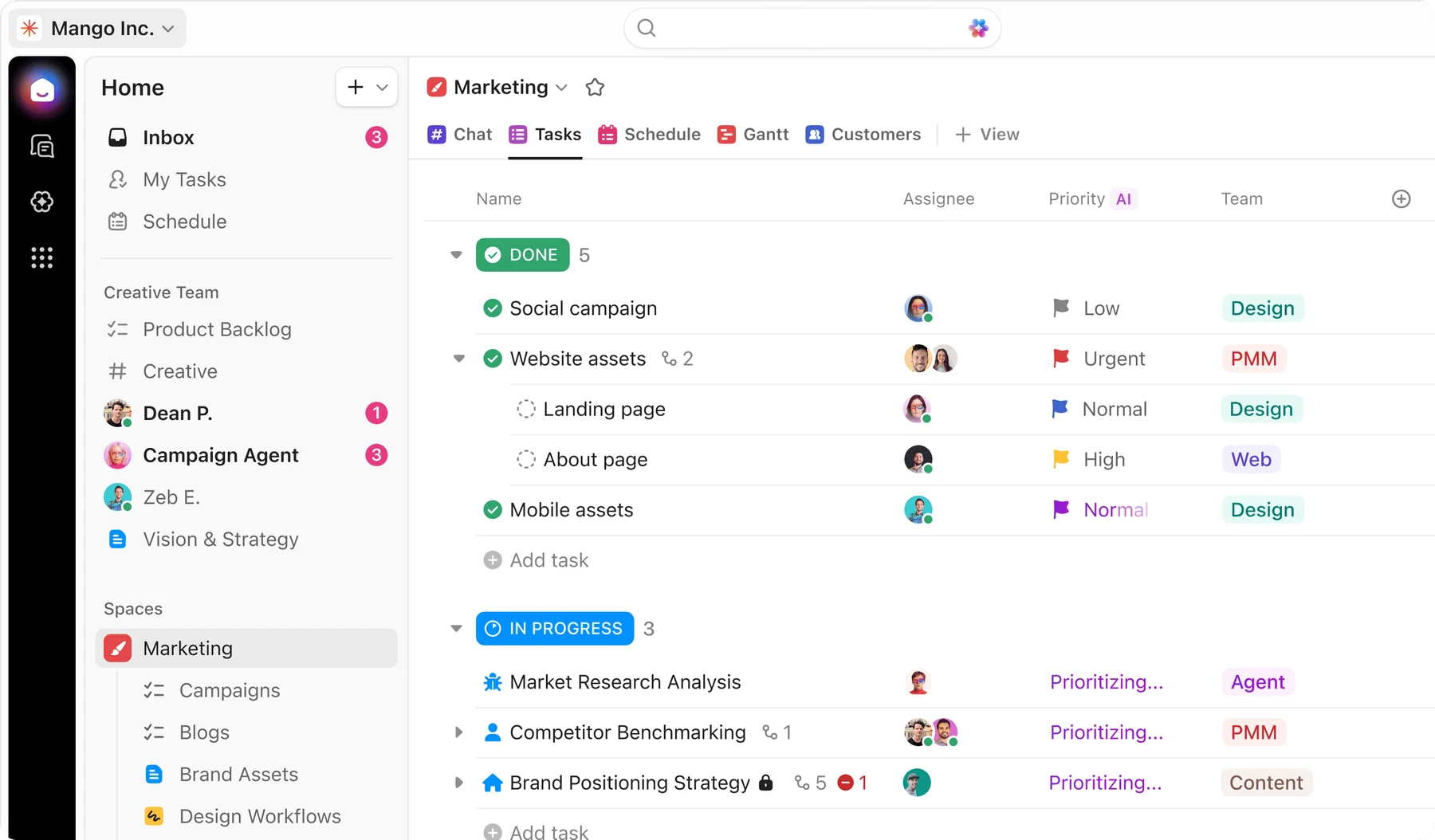
ClickUp organizes work into tasks, lists, folders and spaces, with documents, chat, dashboards and whiteboards alongside project tracking. Teams can switch between board, calendar and Gantt views, collect requests with forms and automate routine updates.
ClickUp is useful when tasks, project documents and conversations need to live together.
Tasks and supporting documents together
Flexible views and custom fields
Configuration needs clear ownership
Large feature set takes time to learn
Best for:
Solo usersSmall teamsGrowing businesses
Best use case: Collecting a request through a form, assigning tasks and tracking delivery with linked project documentation.
Can organize individual projects and shared team workflows; keep configuration proportionate to the work.
Read the full assessment
ClickUp is useful when tasks, project documents and conversations need to live together. Start with one team and a small set of views before adding custom fields and automations. Unlimited covers many ordinary project workflows; Business is worth comparing for dashboards, message history and automation volume. The main tradeoff is setup and ongoing administration. Include every paid workspace member and any AI subscriptions when comparing its cost with separate tools.
Strengths
Tasks and supporting documents together
Flexible views and custom fields
Forms, time tracking and automation
Broad collaboration and integration options
Tradeoffs
Configuration needs clear ownership
Large feature set takes time to learn
Workspace-wide upgrades affect cost
AI subscriptions and credits are extra
Who it suits
Teams consolidating project tools
Agencies managing repeatable workflows
Projects needing customized task views
About ClickUp
ClickUp organizes work into tasks, lists, folders and spaces, with documents, chat, dashboards and whiteboards alongside project tracking. Teams can switch between board, calendar and Gantt views, collect requests with forms and automate routine updates.
The public pricing page offers Free Forever, Unlimited, Business and Enterprise. Unlimited expands storage and project tools, while Business adds advanced dashboards, message history and more automation. AI subscriptions and credits are additional purchases. Because help documentation also describes newer packaging, confirm the edition names and limits shown in your workspace before upgrading.
Pricing & Plans
Prices use the currency shown. Tax, usage limits and billing terms vary by provider.
Save up to 37%
Free Forever
$0/mo
Entry workspace plan for new accounts.
Unlimited tasks
Unlimited free-plan members
Collaborative docs
Kanban boards
Full plan details & limits
Entry workspace plan for new accounts.
Free
Sprint management
Calendar view
Basic custom field manager
In-app video recording
24/7 support
60 MB storage
One form
Feature-specific collaborative limits apply
Recommended
Unlimited
$10/user/mo
Paid plan above Free Forever.
Unlimited spaces
Unlimited folders
Unlimited forms
Unlimited integrations
Full plan details & limits
Paid plan above Free Forever.
USD 10/month per user
Unlimited storage
Unlimited Gantt charts
Unlimited custom fields
Native time tracking
Goals and portfolio management
Permission-controlled guests
Resource management
ClickUp Chat
Email in ClickUp
All workspace members must be upgraded together
Some advanced feature uses are limited
Business
$19/user/mo
Paid plan above Unlimited.
Unlimited dashboards with advanced cards
Unlimited message history
Unlimited activity/timeline views
Webhooks and automation integrations
Full plan details & limits
Paid plan above Unlimited.
USD 19/month per user
5,000 automations per month
Mind mapping
Private whiteboards
Custom exporting
Sprint points and reporting
Portfolio workload management
Google SSO
SMS 2FA
Unlimited proofing
All workspace members must be upgraded together
More plans, volume options & API pricing (1)
Enterprise
Contact sales
Custom-quote plan above Business.
Enterprise permissions and governance
Unlimited custom roles
SAML SSO and SCIM provisioning
Audit log
Full plan details & limits
Custom-quote plan above Business.
Enter your complete quote
Session management
Enterprise API
250,000 automations per month
Custom branding
Default personal views
MSA and HIPAA availability
Data residency
Enterprise-scale automations, integrations, and API usage
Customer ratings from the linked platforms, separate from our recommendations. Scores and counts can change; each platform uses its own review process.
Integrations & connectionsHow ClickUp fits into your workflow
Slack, GitHub, GitLab, Zapier, HubSpot, Basecamp import, Wrike import, Confluence import, OpenAI, Grammarly, Unito, Webhooks, Public API, MCP server
Platforms & availabilityWeb browser · Desktop app: Mac · Desktop app: Windows · Desktop app: Linux · Mobile app: iOS · Mobile app: Android
ClickUp
Free plan: Available. Free trial: Not verified.
Cost considerationsBilling, usage limits and additional fees
Public USD workspace rates: Unlimited $10/user/month or $7 with yearly billing; Business $19 or $12. Upgrades cover all workspace members. Free has 60 MB storage and one form. AI is separate: the displayed annual AI rates are Brain AI $9/user/month and Everything AI $28, with 1,500/5,000 monthly Super Credits respectively. Additional credits are advertised at $10 per 10,000; usage and fair-use limits apply. Help documentation describes newer plan names, so confirm current account packaging rather than mixing its limits into the public tiers. Feature trials are offered; a universal paid-workspace trial duration was not verified.