Kling AI

Turn prompts and reference images into moving scenes

AI Video Generation

Kling AI is a creative studio for generating video and images. Text-to-video and image-to-video are central workflows, with motion control, reference elements and editing features providing ways to guide a scene.

Visit Website

Last checked: September 9, 2026

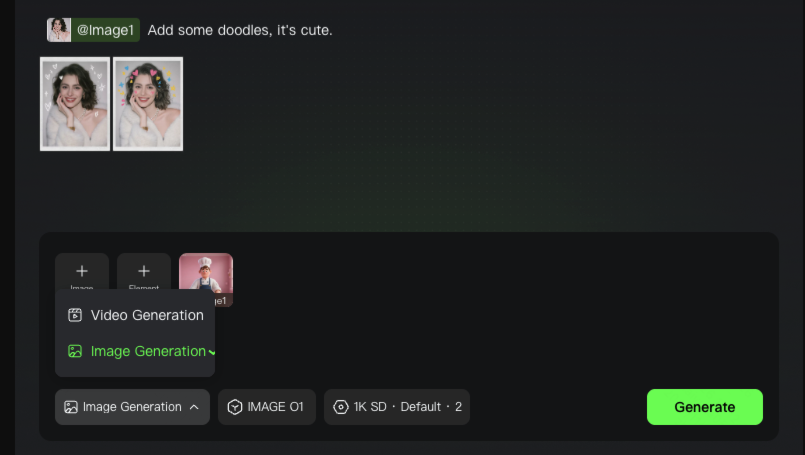
Kling image-generation workflow from its official guide.

Our Take

Kling is worth testing when motion and image-to-video are central to your creative work.

Best for:
Solo usersSmall teams
Best use case: Animating a reference image into a short scene and refining its motion before publication.

Fits individual creators and small teams experimenting with short-form video concepts.

Read the full assessment

Kling is worth testing when motion and image-to-video are central to your creative work. References and motion controls give you more direction than a plain text prompt, but a usable scene may still take several generations. Budget with the platform and model you actually use: an iOS subscription price does not establish the web price, and a headline credit allowance does not translate into a fixed number of finished clips.

Strengths

  • Text and image starting points for video
  • Motion and reference controls
  • Image and video tools in one studio
  • Native API option for programmatic workflows

Tradeoffs

  • Repeated attempts consume credits
  • Pricing and offers differ across platforms
  • Output consistency needs creative review
  • Video settings affect generation cost

Who it suits

  • Short-form video creators
  • Marketers experimenting with motion
  • Creative teams testing visual concepts

About Kling AI

Kling AI is a creative studio for generating video and images. Text-to-video and image-to-video are central workflows, with motion control, reference elements and editing features providing ways to guide a scene. Supported models can add audio, dialogue or multiple shots. Results depend on the selected model and settings, and generation consumes credits. Consumer subscriptions, credit purchases and the Open Platform API are separate budgeting choices. The prices below are verified U.S. iOS purchases; web and regional offers may differ.

Pricing & Plans

Prices use the currency shown. Tax, usage limits and billing terms vary by provider.

Annual billing

Free access

$0/mo

An entry point for trying the creative studio.

  • Access to selected creation tools
  • Exact free credit allowance varies and was not verified
Full plan details & limits

An entry point for trying the creative studio.

Free access

    Standard — iOS

    $10/mo

    A monthly membership listed in the official U.S.

    • Paid creation membership
    • Confirm current credits and model access in the app
    • U.S. iOS pricing; other platforms may differ
    Full plan details & limits

    A monthly membership listed in the official U.S. iOS app.

    US$10/month through the U.S. App Store

      Pro — iOS

      $37/mo

      A monthly membership listed in the official U.S.

      • Paid creation membership
      • Confirm current credits and model access in the app
      • U.S. iOS pricing; other platforms may differ
      Full plan details & limits

      A monthly membership listed in the official U.S. iOS app.

      US$37/month through the U.S. App Store

        Premier — iOS

        $92/mo

        A monthly membership listed in the official U.S.

        • Paid creation membership
        • Confirm current credits and model access in the app
        • U.S. iOS pricing; other platforms may differ
        Full plan details & limits

        A monthly membership listed in the official U.S. iOS app.

        US$92/month through the U.S. App Store

          View full pricing details

          Everything you need to know

          Explore more details about Kling AI.

          FeaturesText-to-video, Image-to-video, Start & end frames-to-video + more.
          • Text-to-video
          • Image-to-video
          • Start & end frames-to-video
          • Native audio
          • Multi-shot generation
          • Element/reference locking
          • Multi-character coreference
          • Multilingual dialogue generation
          • Native text rendering in-frame
          • Image generation
          • Image-to-image
          • Cutouts/background replacement
          • Higher-resolution output
          • Motion control
          RatingsApple App Store: 4.7/5, Google Play: 4.5/5
          • Apple App Store (US)Kling AI: AI Image&Video Maker4.7/5 · 29,619
            Source Checked September 8, 2026
          • Google Play可灵AI:人工智能图像和视频制作器 / Kling AI: AI Image&Video Maker4.5/5 · 54.8万条评价
            Source Checked September 8, 2026

          Customer ratings from the linked platforms, separate from our recommendations. Scores and counts can change; each platform uses its own review process.

          Integrations & connectionsHow Kling AI fits into your workflow

          Kling Open Platform API; third-party integrations were not verified.

          Platforms & availabilityWeb · iPhone and iPad · Mobile app

          Kling AI Pte. Ltd.

          Free plan: Available. Free trial: Not verified.

          Cost considerationsBilling, usage limits and additional fees

          The U.S. App Store lists Standard $10/month, Pro $37/month and Premier $92/month. These are iOS prices, not verified web prices. The website terms also name additional tiers, but a complete current web and annual price table was not available. Credit packs, weekly offers and API usage are separate purchases. Confirm included credits, renewal terms and the exact platform at checkout.

          Not sure Kling AI is right for you?

          Here are a few other great tools to consider.

          View All Alternatives

          Sources & Verification

          Checked September 9, 2026 · 9 sources · View sources

          Provider facts and pricing are separate from our editorial assessments.