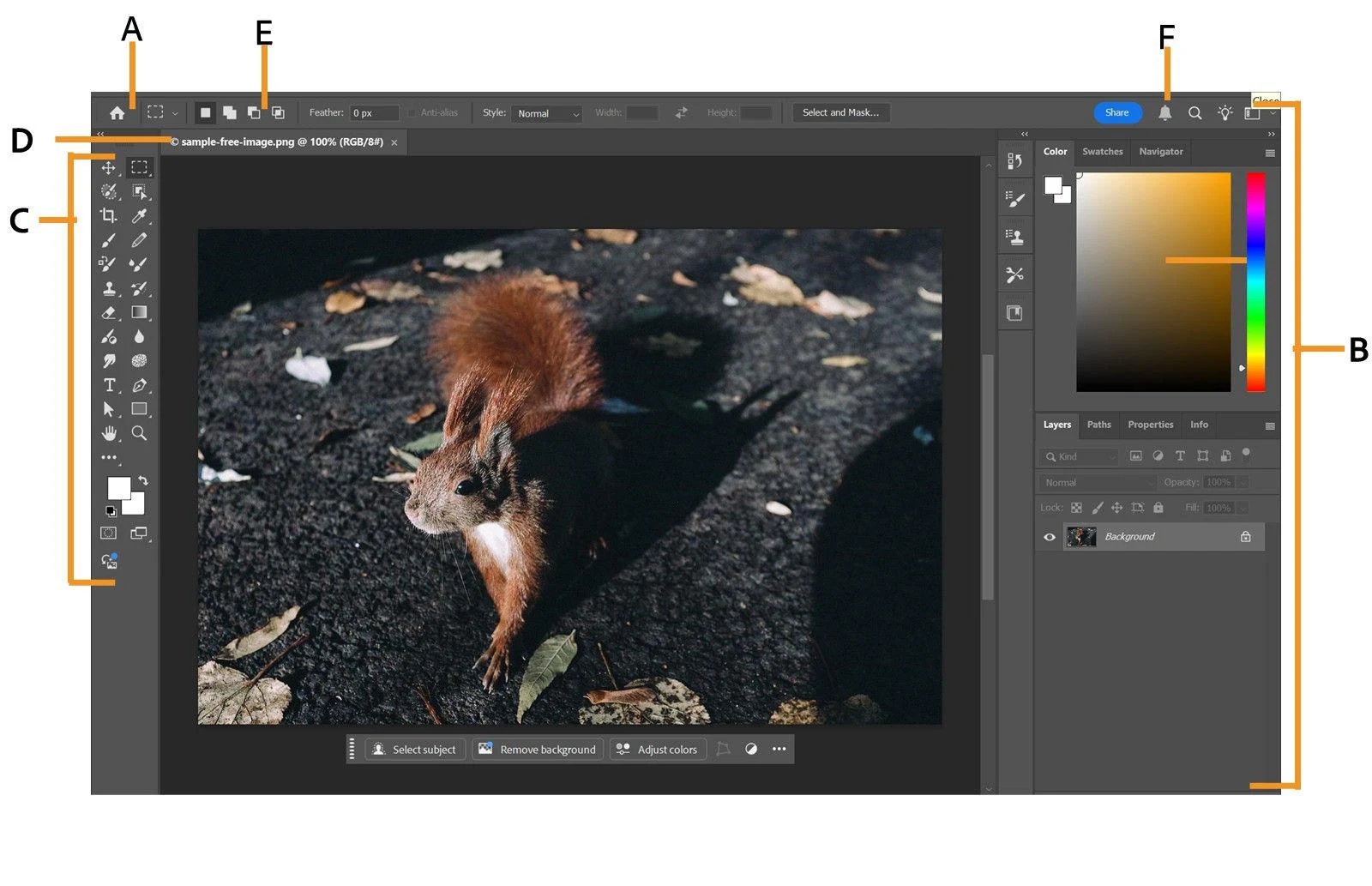
Photoshop is Adobe’s image-editing and compositing application. Layers, masks, selections, adjustment tools and brushes support precise retouching and combining multiple images, while Generative Fill and Generative Expand assist with creating or extending visual content.
Photoshop is a strong fit when image quality depends on careful selections, retouching and layered compositing.
Precise layers, masks and selection controls
Manual and generative editing in one workflow
Detailed work requires practice
Desktop access has an ongoing subscription cost
Best for:
Solo usersSmall teamsGrowing businesses
Best use case: Retouching and compositing a product image with controlled selections, color and layered revisions.
Fits independent designers and photographers as well as teams doing detailed image production.
Read the full assessment
Photoshop is a strong fit when image quality depends on careful selections, retouching and layered compositing. It rewards learning a repeatable editing workflow, especially when several revisions or exact product details matter. Compare Photography with the standalone plan if Lightroom is part of your work, and compare the full Creative Cloud bundle only if you need its other apps. The annual commitment deserves as much attention as the monthly figure.
Photoshop is Adobe’s image-editing and compositing application. Layers, masks, selections, adjustment tools and brushes support precise retouching and combining multiple images, while Generative Fill and Generative Expand assist with creating or extending visual content. Camera Raw and Lightroom connections support photography workflows.
Desktop, web and mobile versions provide different levels of functionality. Subscription bundles vary in included apps, storage and generative credits, so a photographer, marketing designer and business team may need different plans. Desktop access is subscription-based; a trial is not a permanent free plan.
Pricing & Plans
Prices use the currency shown. Tax, usage limits and billing terms vary by provider.
Save up to 7%
Recommended
Photoshop
$22.99/mo
Individual Photoshop subscription.
Photoshop desktop, web and mobile
Adobe Express Premium
100 GB storage
25 monthly generative credits
Full plan details & limits
Individual Photoshop subscription.
US$22.99/month, annual commitment billed monthly
Annual commitment
Photography
$19.99/mo
Photoshop with Lightroom for a photography workflow.
Photoshop desktop, web and mobile
Lightroom
1 TB storage
1,000 monthly generative credits
Full plan details & limits
Photoshop with Lightroom for a photography workflow.
US$19.99/month, annual commitment billed monthly
Annual commitment, paid monthly
Creative Cloud Pro
$69.99/mo
A broader individual creative-app bundle.
Photoshop and more than 20 creative apps
Cross-app creative workflows
100 GB storage
4,000 monthly generative credits
Full plan details & limits
A broader individual creative-app bundle.
US$69.99/month, annual commitment billed monthly
Annual commitment
Photoshop for teams
$37.99/license/mo
Per-license Photoshop with business administration.
Photoshop
Admin Console and asset reclamation
IT deployment tools and business support
1 TB storage per license
Full plan details & limits
Per-license Photoshop with business administration.
Customer ratings from the linked platforms, separate from our recommendations. Scores and counts can change; each platform uses its own review process.
Integrations & connectionsHow Adobe Photoshop fits into your workflow
Lightroom: Edit In Photoshop workflow with save-back to Lightroom., Adobe Camera Raw: raw processing integration across Photoshop, Bridge, and Lightroom., Adobe Express Premium: included with Photoshop plan/trial materials., Frame.io: teamwork collaboration feature mentioned in product materials., Libraries: shared brand assets feature mentioned in product materials., Plug-ins: supported and mentioned in product materials.
Platforms & availabilityDesktop: Windows and macOS, including Apple Silicon and Windows on ARM. · Web: browser-based Photoshop on the web. · Mobile: iPhone, iPad, and Android.
Adobe
Free plan: Not listed for this product. Free trial: Available; check eligibility with the provider.
Cost considerationsBilling, usage limits and additional fees
Regular U.S. prices before tax. The displayed monthly options require an annual commitment; they are not cancel-anytime monthly plans. Photoshop prepaid is $263.88/year and Creative Cloud Pro prepaid is $779.88/year. Temporary introductory and education offers are not used as permanent budget rates. Individual trials run seven days and can convert to a paid subscription. Generative credit allowances vary by bundle, and some Firefly offers include only Photoshop web/mobile access. Check existing Adobe subscriptions for overlap.