10 questions with Melissa Kwan, cofounder and CEO of eWebinar
A useful demo can become a scheduling problem. As more prospects and customers need the same information, repeating it live can limit how many people a small team reaches.
Melissa Kwan experienced that at her previous company. She built eWebinar around recorded sessions that still let people ask questions and get answers. In this Stacked with Founders interview, she explains why asynchronous chat matters, how customer conversations changed the product’s messaging, and where she still prefers live sessions.
These are Melissa’s written responses, with formatting adjusted for readability. Experiences and views are her account. The final answer describes the work and plans she shared at the time of the interview.
What is eWebinar, and who did you build it for?
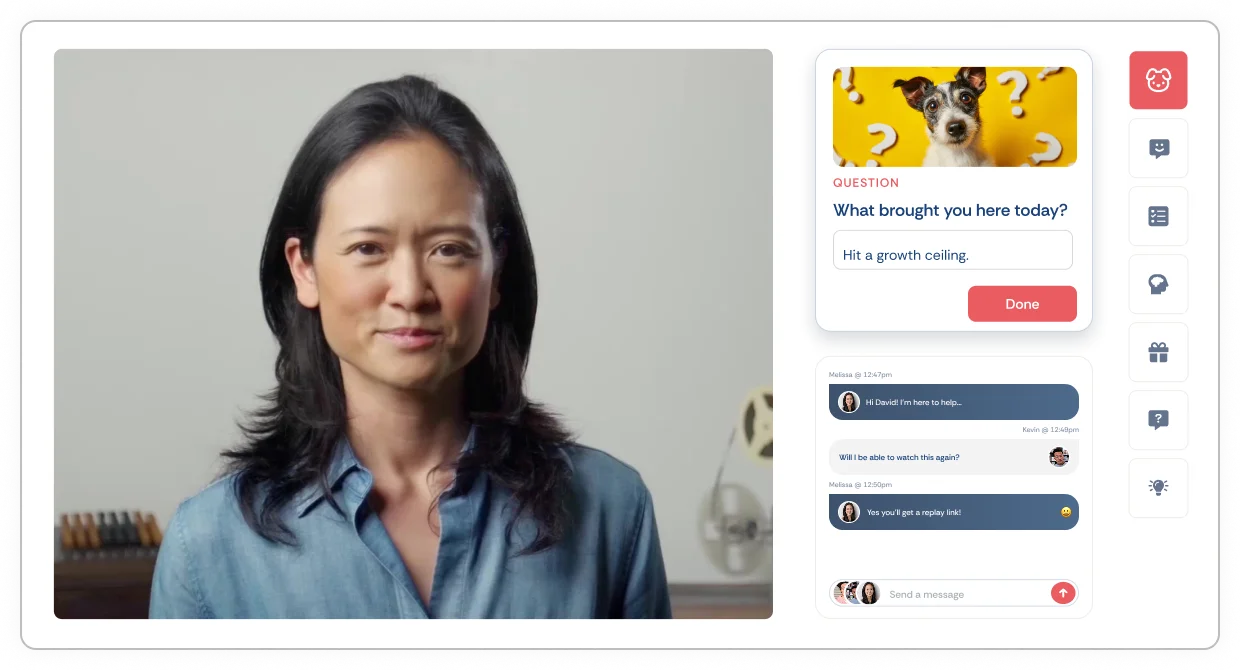
eWebinar is an on-demand video platform with chat. You record something once, a demo, an onboarding session, a training, and it runs on-demand or on a recurring schedule, with real two-way chat and interactions throughout. We help companies scale communication to prospects and customers in a way that feels personal to every attendee.
We built it for teams who deliver the same thing over and over: sales reps running the same demo, customer success teams onboarding every new account, training teams getting the same material in front of hundreds/thousands of customers. If you've ever caught yourself saying "I have given this exact session fifty times (or want to but don’t have the bandwidth)," you are who we built it for.
What experience first made you want to build it?
eWebinar is the product I wish existed when I was running my last company. We had a small team, so I was doing sales, marketing and customer success myself. The same demo to every prospect. The same onboarding to every new customer. The same training every time we shipped a feature. The frustrating part was that it was working, so the more customers we got, the worse the problem got. No matter how many sessions I ran, I could never get to everyone, attendance rate was low, and that ceiling had nothing to do with how hard I worked. It was the limitation baked into doing things live.
What felt missing from the automated webinar tools already available?
Asynchronous chat, which is the one thing that makes automation work well. Most of what existed (and still does) was built for info-marketing funnels, with fake chat and fake attendee counts, so serious companies took one look and walked away. They didn’t want to trick their customers. I was one of those people. I went looking for a product like this at my last startup, couldn’t find one, and started eWebinar after that company was acquired. The rest of the market was live platforms with an automated feature bolted on the side, and a bolted-on feature never gets the investment the core product does.
What we wanted was simple. Let people ask questions during an automated session and get real answers from real people, whether the reply lands in thirty seconds or two hours. That’s what our customers come to us for, because it’s the thing that lets a conversation happen and a relationship get built.
Automation has a reputation for feeling less personal. When done right, it’s the opposite. Every attendee gets your full attention one on one, instead of sitting muted in a room of a hundred people where most questions never get answered.
How do you approach making an automated webinar feel engaging and personal?
Two things, chat and interactions. Chat works like texting, so attendees message you during the session and anyone on your team can hop in and answer, often straight from Slack. If nobody is around, an auto response goes out and the person hears back by email, so no question ever gets dropped.
Then there are the interactions. We built in more than 25 of them: polls, questions, tips, offers, hotspots, all appearing throughout the session so people are participating instead of just watching. That does two jobs. It keeps attendees on your screen instead of on their phones, and it captures real information about who they are and what they care about, so our customers can follow up properly and see what’s landing and what isn’t.
Interactions can also be conditional, meaning what someone sees depends on how they answered something earlier. So every attendee ends up with a session that feels like it was built for them, because it was.
Is there a feature or use case you wish more people knew about?
Ha, so many. We do a bad job of surfacing our own features, and it’s something we’re working on right now through in-app notifications and a better onboarding series.
If I had to pick one feature, it’s the attendee hub. Every eWebinar someone has ever watched lives there, and it works across companies. So if you’ve attended sessions from three different companies, all three show up in one place for you to go back to. Each replay keeps the notes, highlights and bookmarks that person saved during the session, so it isn’t a static video sitting on a landing page, it’s a resource built around what they cared about. For our customers, it means they stay in front of their prospects and customers long after the session ends, and they’re giving attendees something useful to revisit.
For a use case, I wish more people knew they can turn their old live recordings into interactive replays. Most teams drop their past Zoom recordings on YouTube and call it a day, and in doing that they give up lead capture, chat and every bit of interactivity. Wouldn’t you want to know who watched? And be able to keep talking to those people after the event is over?
It doesn’t have to be live or automated. A great content and communication strategy has both. It’s figuring out how each format can work for you.
Which businesses get the most value from eWebinar, and when might a live webinar be a better fit?
SaaS, proptech and real estate brokerages are our biggest customer groups right now. But the real pattern is companies that need to get information to people who don’t work a fixed nine to five. Think independent contractors like real estate agents and insurance agents, also doctors, nurses, students and business owners. As you’d imagine, those are the people who value on-demand the most, because their schedules are chaotic and unpredictable.
As for live, live is great and I mean that. Keep live for the things that are one-offs: a big product launch where you want to drive hype, a Q&A with a named guest or influencer, a one-to-one sales conversation, anything responding to something that happened this week.
Time is precious, and it’s too precious to spend on the session you repeat every Tuesday. Our customers automate the repeatable so they can spend their live hours on the conversations that actually need them in the room.
What has surprised you most while building the company?
How long you can be wrong about your own business while everything looks fine on paper. We were profitable, customers loved us, the numbers kept going up, and then growth flattened and I could not work out why.
This is a super long conversation. In short, we realized that we didn’t have product-messaging fit, and it’s something that we spent the last half year fixing. I documented everything in detail on this piece: The strategy that got us to profitability and kept us small
Has customer feedback changed your thinking about the product?
Absolutely, though not in how we build it. In how we talk about it.
I started this company because I was exhausted from doing the same demos and trainings over and over, so I couldn’t imagine anyone in my position enjoying it. From day one we sold eWebinar on that exhaustion. “Aren’t you tired of giving the same presentation again and again?” Then earlier this year, when I realised our messaging wasn’t landing, I started talking to prospects who didn’t sign up. A lot of people hired to do that job tie their value to delivering those sessions and connecting with customers, so the question actually offended them. I was telling them the best part of their job was a burden. Whether someone is tired or not is debatable.
So we changed the value we lead with. If you deliver your demos, onboarding and training live, you can only ever get in front of so many people, and that limits your growth. That part isn’t debatable. We had always delivered that value, it just wasn’t front and centre.
The other one was two words: live chat. We used it for years because we assumed people understood that live doesn’t mean live all the time. There’s a chat button on every website now, and it’s live and asynchronous at the same time. But people hearing “live chat” immediately panicked that they’d have to staff it around the clock so they would be turned off. We changed it to chat that works like texting, and that fear never came up again. We thought live chat was a selling point. Most people were reading it as a reason to say no!
What advice would you give someone turning their first live presentation into an automated webinar?
Use the recording you already have, like the live recording of a session you ran last month, and just get started. Don’t disappear for three weeks trying to make a perfect studio version, because the one you already gave is better than the one you keep putting off.
Trim the housekeeping. Cut anything that isn’t evergreen or that will make people bounce, like dead waiting time at the start. Upload it to eWebinar, add an intro telling people, “This is an interactive replay of a session I did before.” Add a few interactions throughout so people have something to engage with every few minutes, and get it out there.
What that does is demystify the idea that people don’t like automation, which isn’t true. People care about great content and a great experience. Once you get comfortable with it, you’ll come up with all kinds of ways to use eWebinar in your business, and you’ll start freeing up your time.
What are you working on next?
Using AI to make the whole eWebinar more automated, without losing what makes it feel personal to every attendee. That’s the balance we care about most.
The first piece is eChat, our AI moderator. It steps in to answer chat when nobody on the team is around, and it trains on your session transcript, your past chats and whatever other material you give it, so it answers the way your team would. It’s a teammate, not a replacement.
The second piece is creation. Getting someone to upload their first video is a huge lift, and I get it, that’s where most people stall. We just rolled out our MCP, so you can build an eWebinar by talking to Claude or ChatGPT instead of clicking through setup. We have some ideas on the video creation side too, so stay tuned for that.
My take
Melissa’s advice to start with a recording you already have is a practical way to test the idea. Remove outdated material, explain that it is a replay, and make it easy to ask questions. Her distinction between repeatable sessions and conversations that need to happen live is useful even if you choose another platform. Before adding eWebinar to your stack, budget for your active recordings and registrant volume, and decide who will handle follow-up.