Calendly

Let people book the right meeting without email back-and-forth

Scheduling

Calendly lets people book meetings against connected calendar availability using a scheduling link or website embed. Hosts control meeting types, buffers and booking rules, while paid plans add reminders, payment connections and more calendar integrations.

4.7/5(4,144)CapterraFree plan available
Visit Website

Last checked: September 9, 2026

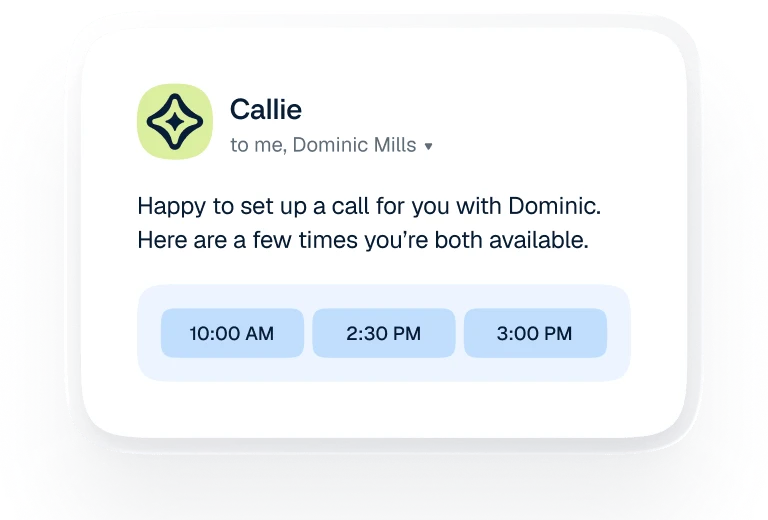
Calendly scheduling assistant offering available meeting times

Our Take

Calendly is useful when scheduling causes repeated back-and-forth or meetings need to reach the right teammate automatically.

Best for:
Solo usersSmall teamsGrowing businesses
Best use case: Routing a qualified inbound lead to an available salesperson and sending automatic meeting reminders.

Useful for independent consultants and teams coordinating customer appointments.

Read the full assessment

Calendly is useful when scheduling causes repeated back-and-forth or meetings need to reach the right teammate automatically. Start with a real booking flow and check availability, buffers and reminders from the invitee’s side. Free can handle one simple meeting type; Standard adds the flexibility many small businesses need. Teams is justified by assignment and routing. Compare existing calendar-suite scheduling first, and budget meeting AI separately if it will be used.

Strengths

  • Shareable booking links and embeds
  • Calendar conflict checks and booking rules
  • Team routing and round-robin assignment
  • Reminders and payment integrations

Tradeoffs

  • Advanced workflows require paid host seats
  • Simple needs may already be covered by a calendar suite
  • AI features add to the base price
  • Connected calendars and routing require careful setup

Who it suits

  • Consultants booking client sessions
  • Sales teams routing inbound meetings
  • Service businesses taking scheduled appointments

About Calendly

Calendly lets people book meetings against connected calendar availability using a scheduling link or website embed. Hosts control meeting types, buffers and booking rules, while paid plans add reminders, payment connections and more calendar integrations. Invitees do not need a paid seat. Standard serves individual and small-team scheduling. Teams adds round-robin distribution and lead routing, and Enterprise expands administration and CRM workflows. Notetaker and the Callie AI assistant are optional paid capabilities, with English-language availability at review time; they should not be assumed to come with the base scheduling price.

Pricing & Plans

Prices use the currency shown. Tax, usage limits and billing terms vary by provider.

Save up to 20%

Free

$0/mo

Always-free plan for basic scheduling.

  • Customizable booking page
  • One-on-one scheduling
  • Browser extension
  • Mobile app
Full plan details & limits

Always-free plan for basic scheduling.

Free

  • One event type
  • One calendar connection
Recommended

Standard

$12/seat/mo

Scheduling with multiple event types, reminders and payment integrations.

  • Unlimited event types
  • Multiple calendars
  • Automations/reminders
  • HubSpot
Full plan details & limits

Scheduling with multiple event types, reminders and payment integrations.

USD 12/month per seat

  • Mailchimp
  • Stripe
  • PayPal
  • Zapier
  • Webhooks
  • Six calendar connections per seat
  • Notetaker and Callie are additional paid capabilities

Teams

$20/seat/mo

Team assignment and routing for shared scheduling workflows.

  • Round-robin and team scheduling
  • Lead qualification/routing
  • Centrally managed event types
  • Marketo
Full plan details & limits

Team assignment and routing for shared scheduling workflows.

USD 20/month per seat

  • Pardot
  • Salesforce sending
  • Optional SSO security add-on
  • Six calendar connections per seat
  • Notetaker and Callie are additional paid capabilities

Scheduling with Notetaker and Callie

Variable cost

A Standard or Teams configuration with additional meeting AI.

  • Selected scheduling edition
  • Meeting transcripts and shareable recaps
  • Callie email scheduling assistant
  • English only at review time
Full plan details & limits

A Standard or Teams configuration with additional meeting AI.

Enter your complete quote

  • Confirm complete bundle price and AI limits
More plans, volume options & API pricing (1)

Enterprise

Variable cost

Higher-tier plan for larger teams.

  • Teams features
  • Microsoft Dynamics
  • Dedicated support
  • SSO/SAML
Full plan details & limits

Higher-tier plan for larger teams.

Enter your complete quote

  • Domain control
  • Audit log compliance
  • Data deletion API
  • Starts at 50 seats
  • USD only
  • Starts at $15,000/year
View full pricing details

Everything you need to know

Explore more details about Calendly.

FeaturesBooking links, Website embeds, Routing forms + more.
  • Booking links
  • Website embeds
  • Routing forms
  • Availability control
  • Meeting templates
  • Reminders
  • Multi-person scheduling
  • Round robin
  • Post-meeting workflows
  • Callie email-based scheduling
  • Notetaker recaps/transcripts/follow-up drafts
  • Payments for upfront charges
  • Payment links
  • Packages
  • Invoices
RatingsCapterra: 4.7/5, Apple App Store: 4.8/5, Google Play: 4.6/5
  • CapterraCalendly4.7/5 · 4,144
    Source Checked September 8, 2026
  • Apple App Store (US)Calendly: Meeting Scheduling4.8/5 · 54,715
    Source Checked September 8, 2026
  • Google PlayCalendly: Meeting Scheduling4.6/5 · 18.9K
    Source Checked September 8, 2026

Customer ratings from the linked platforms, separate from our recommendations. Scores and counts can change; each platform uses its own review process.

Integrations & connectionsHow Calendly fits into your workflow

Google Calendar, Google Meet, Microsoft Teams, Outlook, Office 365, Zoom, HubSpot, Mailchimp, Stripe, PayPal, Zapier, Webhooks, Google Analytics, Meta Pixel, Gmail, Marketo, Salesforce, Microsoft Dynamics 365, Power Automate

Platforms & availabilityWeb app · Mobile app · Browser extension

Calendly, Inc.

Free plan: Available. Free trial: Available; check eligibility with the provider.

Cost considerationsBilling, usage limits and additional fees

USD base scheduling rates per seat/month: Standard $12 monthly or $10 yearly; Teams $20 or $16. Free includes one event type and one calendar connection; paid plans connect six calendars. Enterprise starts at $15,000/year and 50 seats, with a complete sales quote required. Notetaker and Callie require an additional bundle; the base rates exclude them. Teams SSO can also cost extra. Invitees do not require a paid seat. New users receive a two-week Teams trial before continuing on Free unless they upgrade. Payment processing fees are separate.

Not sure Calendly is right for you?

Here are a few other great tools to consider.

View All Alternatives

Sources & Verification

Checked September 9, 2026 · 6 sources · View sources

Provider facts and pricing are separate from our editorial assessments.